Macbook Air
Macbook Air
- Sleek Space Gray MacBook Air with a compact 13.3″ Retina display and 256GB storage.
- Powered by Apple M1 chip with 8-core CPU for fast, smooth everyday performance.
- 8GB unified memory keeps multitasking, browsing, and creative work responsive.
- Up to 18 hours of battery life for all-day productivity on a single charge.
- Fanless design with backlit keyboard delivers silent operation and comfortable use.
- MacOS offers a smooth, intuitive experience with seamless Apple ecosystem integration.
Couldn't load pickup availability
- Free Shipping: We are offering free shipping on all orders.
- Free 14-Day Trial : Contact us within 14 calendar days for hassle-free returns.
Full Specifications
Full Specifications
- Screen Size: 13.3 inches
- Type: Retina Display
- Technology: LED-backlit, IPS, True Tone
- Resolution: 2560 x 1600 pixels
- Chip: Apple M1
- CPU: 8-core CPU
- GPU: Integrated 7-core or 8-core GPU
- Performance: Up to 3.5x faster than previous generation
- RAM: 8GB Unified Memory
- Storage: 256GB SSD (Soldered, not expandable)
- Battery Life: Up to 18 hours (varies by use)
- Power Adapter: 30W USB-C
- Charging: USB-C (included 2m cable)
- Design: Fanless (Silent operation)
- Color: Space Gray
- Material: 100% Recycled Aluminum Enclosure
- Weight: 2.8 pounds (1.29 kg)
- Dimensions: 11.97 x 8.36 x 0.63 inches
- Keyboard: Backlit Magic Keyboard
- Trackpad: Force Touch Trackpad
- Ports: 2 x Thunderbolt / USB 4 (USB-C)
- Wireless: Wi-Fi 6, Bluetooth 5.0
- Security: Touch ID Sensor
- Webcam: FaceTime HD Camera (720p)
- Microphone: Three-mic Array
- Speakers: Stereo Speakers with Wide Stereo Sound
- Operating System: macOS
- Ecosystem: Works with iPhone/iPad (Handoff, Sidecar, Universal Clipboard)
- App Compatibility: Runs iPhone/iPad apps, all existing Mac apps including Adobe Creative Cloud, Microsoft 365
- Instant Wake: Immediate startup from sleep
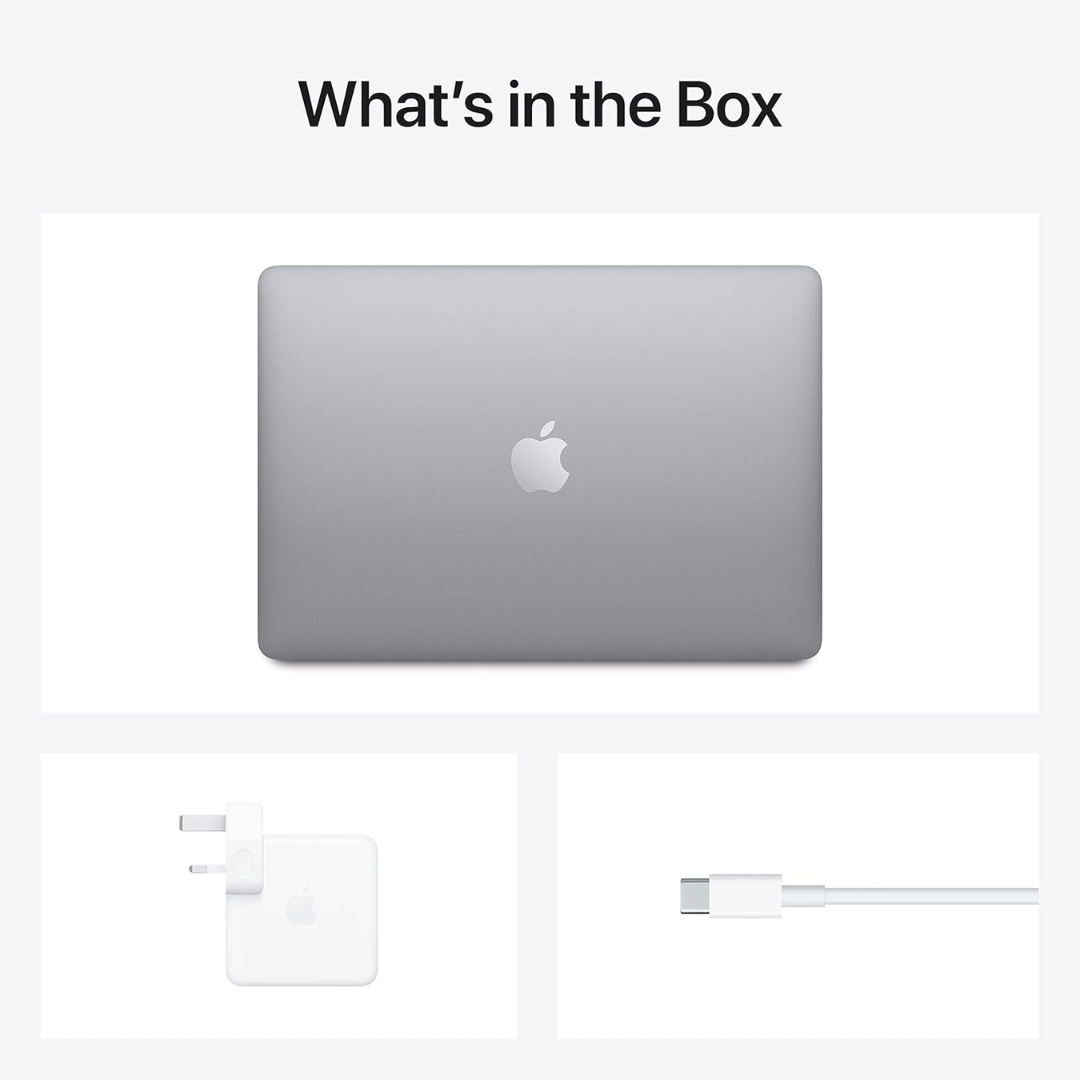
What's in the box
What's in the box
- 1x MacBook Air 2020 Laptop (13-inch, Space Gray)
- 1x 30W USB-C Power Adapter (Charger Head)
- 1x USB-C Charge Cable (2m)
- 1x User Guide
FAQs
FAQs
What makes the M1 chip so special in this MacBook Air?
The Apple M1 chip is the first Apple-designed silicon for Mac, featuring an 8-core CPU that delivers up to 3.5x faster performance than previous Intel-based models. It combines the CPU, GPU, Neural Engine, I/O, and memory controller onto a single chip for incredible efficiency and performance.
How long does the battery actually last in real-world use?
Apple claims up to 18 hours of battery life. In practical use, most users report 12-16 hours for typical tasks like web browsing, document editing, and video streaming. For more intensive tasks like video editing, expect 8-10 hours.
Can this MacBook Air run Windows or Windows applications?
The M1 chip uses ARM architecture, so it cannot natively run Windows through Boot Camp like Intel Macs could. However, you can use virtualization software like Parallels Desktop to run ARM versions of Windows 11 and x86 applications through emulation.
Is 8GB of RAM enough for professional work?
For most users, 8GB is sufficient thanks to the unified memory architecture and memory optimization of the M1 chip. However, for heavy video editing, 3D rendering, or running multiple virtual machines, consider upgrading to 16GB if available.
Does this MacBook Air have heating or fan noise issues?
No—this model features a completely fanless design. The M1 chip is so energy-efficient that it generates minimal heat during normal operation, keeping the laptop completely silent even during moderate workloads.
What's the difference between this 2020 M1 MacBook Air and the 2022 M2 model?
Key differences include: M2 chip (faster), new MagSafe charging, slightly brighter display, 1080p webcam (vs 720p), new design with flatter edges, and slightly better speakers. The 2020 model remains excellent value.
Can I connect this to external monitors?
Yes, but with limitations. The M1 MacBook Air supports only one external display up to 6K resolution via Thunderbolt/USB 4. You cannot connect multiple external displays natively, but docking stations with DisplayLink technology can work around this.
How well does it work with iPhone and iPad?
Exceptionally well thanks to Apple's ecosystem features: Handoff (continue tasks between devices), Universal Clipboard, Sidecar (use iPad as secondary display), AirDrop, and seamless iCloud sync. iPhone apps can also run directly on macOS.
Is the 256GB SSD storage expandable?
No, the SSD is soldered to the
motherboard and cannot be upgraded after purchase. Consider your storage needs carefully, as you'll need to rely on external drives or cloud storage for expansion.
What software compatibility issues should I be aware of?
Most major applications have been updated for Apple Silicon. Some older Intel-only applications run through Rosetta 2 translation (with minimal performance impact). Check specific software requirements, especially for specialized professional tools or older games.
Pro Tip: This model was groundbreaking for its performance-per-watt ratio, making it one of the most efficient laptops ever released. Its value remains high even as newer models are available.

Slim Profile. Powerful Performance.
Do more of what you love. FASTER.
The groundbreaking power of Apple silicon. All-day battery life. Brilliant displays. So you can create, play, and do more than ever before.
Brilliant Display
Richer contrast. Sharper detail. Everything looks gorgeous on the latest Mac displays.
Work SMARTER. Play harder.
Apple silicon brings game-changing power and speed to everything you do.
Security built right in.
Now on every Mac, Touch ID is a secure way to safeguard your Mac and sign in to apps and sites. Built-in protection from malware and viruses comes standard.
-
Durable and Slick Design
Made of seriously strong aluminum, Mac is designed with durability in mind.
-
Long Lasting Battery Life
Mac laptops deliver up to 18 hours of battery life, so you can stay unplugged all day.
-
Faster Performance
The game-changing speed of
Macbook Air helps you fly
through tasks, no matter where
you are or what you want to do.
Next-Level Productivity Starts Here
Technical Specifications
The Apple 2020 MacBook Air with M1 chip revolutionized laptop performance with groundbreaking efficiency, incredible battery life, and seamless Apple ecosystem integration.
Key Specs
| Model | MGN63ZS/A (Space Gray) |
| Processor | Apple M1 Chip (8-core CPU) |
| Display | 13.3" Retina Display |
| Memory (RAM) | 8GB Unified Memory |
| Storage (SSD) | 256GB |
| Operating System | macOS |
| Graphics | Integrated 7-core or 8-core GPU |
| Battery Life | Up to 18 hours |
| Cooling System | Fanless Design (Silent Operation) |
| Keyboard | Backlit Magic Keyboard |
| Camera | FaceTime HD Camera (720p) |
| Security | Touch ID Sensor |
| Connectivity | Wi-Fi 6, Bluetooth 5.0 |
| Ports | 2 x Thunderbolt / USB 4 (USB-C) |
| Audio | Stereo Speakers, Wide Stereo Sound |
| Microphone | Three-mic Array |
| Materials | 100% Recycled Aluminum Enclosure |
| Weight | 2.8 pounds (1.29 kg) |
| Dimensions | 11.97 x 8.36 x 0.63 inches |
| Warranty | 1-Year Limited Warranty + 90-Day Support |
| Ecosystem Compatibility | Works with iPhone/iPad (Handoff, Sidecar, etc.) |
| Display Resolution | 2560 x 1600 pixels |
| Display Technology | LED-backlit, IPS, True Tone |
| Power Adapter | 30W USB-C Power Adapter |
| Special Features | Force Touch Trackpad, Instant Wake |
FAQs
Got a Question? We’ve Got Answers.
Find answers to commonly asked questions about this product. If you cannot find what you're looking for, we're here for you whenever you need.
Contact usFAQs
What makes the M1 chip so special in this MacBook Air?
The Apple M1 chip is the first Apple-designed silicon for Mac, featuring an 8-core CPU that delivers up to 3.5x faster performance than previous Intel-based models. It combines the CPU, GPU, Neural Engine, I/O, and memory controller onto a single chip for incredible efficiency and performance.
How long does the battery actually last in real-world use?
Apple claims up to 18 hours of battery life. In practical use, most users report 12-16 hours for typical tasks like web browsing, document editing, and video streaming. For more intensive tasks like video editing, expect 8-10 hours.
Can this MacBook Air run Windows or Windows applications?
The M1 chip uses ARM architecture, so it cannot natively run Windows through Boot Camp like Intel Macs could. However, you can use virtualization software like Parallels Desktop to run ARM versions of Windows 11 and x86 applications through emulation.
Is 8GB of RAM enough for professional work?
For most users, 8GB is sufficient thanks to the unified memory architecture and memory optimization of the M1 chip. However, for heavy video editing, 3D rendering, or running multiple virtual machines, consider upgrading to 16GB if available.
Does this MacBook Air have heating or fan noise issues?
No—this model features a completely fanless design. The M1 chip is so energy-efficient that it generates minimal heat during normal operation, keeping the laptop completely silent even during moderate workloads.
What's the difference between this 2020 M1 MacBook Air and the 2022 M2 model?
Key differences include: M2 chip (faster), new MagSafe charging, slightly brighter display, 1080p webcam (vs 720p), new design with flatter edges, and slightly better speakers. The 2020 model remains excellent value.
Can I connect this to external monitors?
Yes, but with limitations. The M1 MacBook Air supports only one external display up to 6K resolution via Thunderbolt/USB 4. You cannot connect multiple external displays natively, but docking stations with DisplayLink technology can work around this.
How well does it work with iPhone and iPad?
Exceptionally well thanks to Apple's ecosystem features: Handoff (continue tasks between devices), Universal Clipboard, Sidecar (use iPad as secondary display), AirDrop, and seamless iCloud sync. iPhone apps can also run directly on macOS.
Is the 256GB SSD storage expandable?
No, the SSD is soldered to the motherboard and cannot be upgraded after purchase. Consider your storage needs carefully, as you'll need to rely on external drives or cloud storage for expansion.
What software compatibility issues should I be aware of?
Most major applications have been updated for Apple Silicon. Some older Intel-only applications run through Rosetta 2 translation (with minimal performance impact). Check specific software requirements, especially for specialized professional tools or older games.
Pro Tip: This model was groundbreaking for its performance-per-watt ratio, making it one of the most efficient laptops ever released. Its value remains high even as newer models are available.